Overview
This guide explains how to create and use authentication credentials for the OData API.
Authentication is required when submitting data to Varibill through the OData API.
Before You Begin
Make sure you have access to the relevant Varibill environment and permission to create authentication records.
If you plan to test in staging, confirm that your staging access has been provisioned before you begin.
Create an Authentication Key
- Open the Varibill User Interface
- From the Navigation menu, select:
Tenant → Authentication
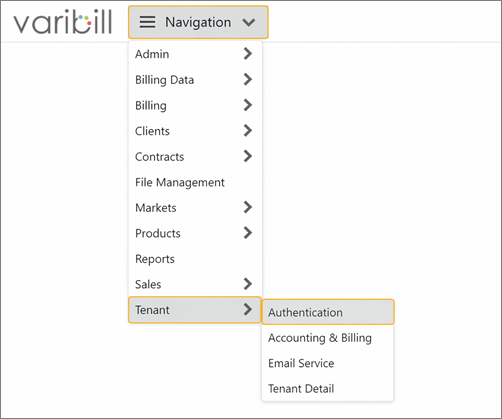
- On the Tenant Authentication screen, click New
- In the Tenant Authentication Editor, enter only a Name for the authentication record
- Click Save
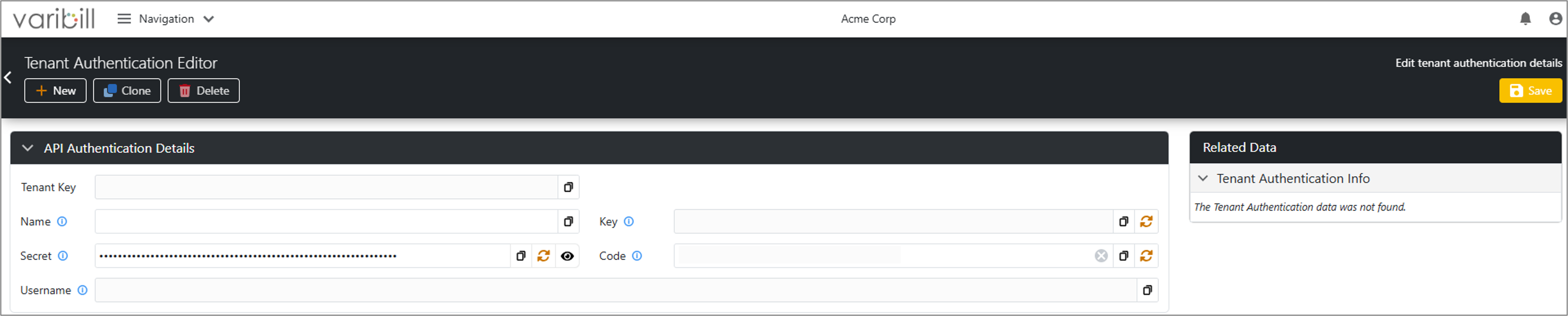
Note: Once saved, Varibill generates authentication credentials automatically.
Generated Credentials
After saving the authentication record, the following values are generated:
- Tenant Key
- Key
- Secret
- Code
- Username
These credentials are used to authenticate API requests.
Tip: The Secret, Key, and Code can be regenerated using the Regenerate button to the right of each field. Use this option when credentials need to be rotated or are no longer considered secure. After regenerating a Key or Secret, update any integrations that use the previous values.
How Authentication Works
The OData API uses Basic Authentication.
When making an API request you must use basic authentication.
- Username = The system generated Username (generated within the Authentication window)
- Password = The system generated Secret (from within the Authentication window)
Using the Credentials
A single authentication key may be used across multiple API requests.
Separate credentials are not required for separate submissions unless you want to manage them independently.
Rate Limiting Considerations
Authentication credentials are subject to API rate limits.
If you are processing high volumes of data, you may choose to create multiple authentication records to distribute requests across credentials.
Testing in Staging
If you are testing your integration before production rollout:
- Confirm whether your Tenant is available in the staging environment
- If you do not have a Tenant in staging, log a request with Varibill Support
- Once your data has been migrated to staging, create or use an authentication record in that environment
- Use those credentials when calling the staging OData API
Was this article helpful?
That’s Great!
Thank you for your feedback
Sorry! We couldn't be helpful
Thank you for your feedback
Feedback sent
We appreciate your effort and will try to fix the article